The Ultimate Setup Guide for Your Viaim Recdot Earbuds
In the rapidly evolving landscape of personal audio, the Viaim Recdot Earbuds have emerged as a unique contender, specifically targeting a niche that blends high-quality sound with productivity-enhancing features. Unlike standard consumer earbuds that focus solely on music playback, the Recdot line is engineered for the professional who maneuvers through a day of conference calls, voice memos, and mobile multitasking. This guide serves as a comprehensive roadmap for getting the most out of these sophisticated devices, ensuring that every feature—from AI-driven transcription to active noise cancellation—is optimized for your specific lifestyle.
The philosophy behind the Viaim Recdot is centered on "intelligence in the ear." While many manufacturers prioritize bass response or aesthetics above all else, Viaim has leveraged advanced processing power to bridge the gap between communication and documentation. For many users, these earbuds are not just a peripheral for their smartphone; they are a secondary brain, capable of capturing ideas and meetings with a level of clarity and organizational efficiency that was previously only available through dedicated recording hardware or software suites.
Understanding the Viaim Recdot Hardware
Before diving into the software configuration, it is essential to appreciate the architectural design of the Viaim Recdot. The earbuds feature a sleek, ergonomic build designed for long-duration wear, which is critical for their intended use in lengthy meetings or study sessions. They utilize a high-performance chipset capable of handling complex acoustic algorithms in real-time, allowing for features like dual-device connectivity and seamless switching between inputs.
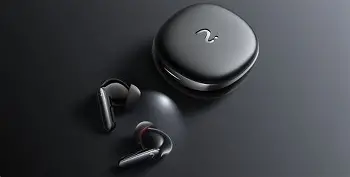
The charging case is more than just a battery; it serves as the hub for the initial pairing process and houses the physical buttons required for manual resets. Inside the earbuds themselves, multiple microphones are strategically placed to differentiate between the user’s voice and ambient environmental noise. This spatial awareness is the foundation of the Recdot’s marketing claim: providing crystal-clear communication even in crowded subway stations or bustling coffee shops.
Unboxing and Initial Charging
The first step in any successful setup is ensuring a full power cycle. Upon unboxing, users will find the earbuds, the charging case, a variety of silicone ear tips, and a charging cable. It is highly recommended to charge the device for at least two hours before the first use. This ensures that the firmware has stable power during any initial updates that may be triggered once the earbuds connect to the companion application.
The LED indicator on the front of the case provides immediate feedback on battery levels. A solid light generally indicates a full charge, while pulsing patterns often signal the device is in pairing mode or charging. Selecting the correct ear tip size is often overlooked but is arguably the most important physical step. A proper seal is necessary for both passive noise isolation and the optimal performance of the Active Noise Cancellation (ANC) system. Experiment with all provided sizes to find a fit that feels secure but does not cause pressure points in the ear canal.
The Step-by-Step Pairing Process
Pairing the Viaim Recdot is straightforward, but taking advantage of the multi-point connection feature requires a bit more intent. For a standard single-device setup, simply opening the case lid is usually enough to enter Bluetooth pairing mode. On your smartphone or computer, navigate to the Bluetooth settings and select "Viaim Recdot" from the list of available devices.
For professionals who juggle a laptop and a smartphone, the multi-point setup is a game-changer. After pairing with the first device, disable Bluetooth on that device temporarily. Put the earbuds back into the case and hold the physical pairing button on the case for three seconds until the light pulses. Pair the second device. Once the second connection is established, re-enable Bluetooth on the first device. The Recdot will now intelligently switch audio sources based on priority—for instance, if you are watching a video on your laptop and a call comes through on your phone, the earbuds will automatically pivot to the call.
Optimizing the Viaim App Experience
While the earbuds function as standard Bluetooth audio devices out of the box, the true power of the Viaim Recdot lies within the proprietary app. This software acts as the control center for the AI transcription features, EQ settings, and button mapping. Upon downloading the app, users will be prompted to create an account, which is necessary for syncing voice recordings and transcriptions to the cloud for later review on a desktop interface.
Find top-rated Audio & Headphones products at great prices.
Browse Now →AI Recording and Transcription Setup
One of the standout features of the Recdot is its ability to record and transcribe audio directly. This is particularly useful for university students recording lectures or business professionals documenting board meetings. Within the app, users can define the language of the transcription. The Recdot supports dozens of languages and dialects, and selecting the specific regional accent can significantly improve accuracy.
Users should also configure the "One-Touch Recording" shortcut. By mapping a long press on either earbud to start a recording, you can capture spontaneous ideas without ever reaching for your phone. The app allows you to categorize these recordings into folders, such as "Work," "Journal," or "Ideas," streamlining the organization process. It is important to note that transcription takes place via a cloud-based AI engine, so ensuring your app has permissions for background data usage is vital for a smooth experience.
In-Depth Product Analysis
The Viaim Recdot occupies a space between premium consumer audio and specialized professional tools. In terms of acoustic performance, the earbuds offer a balanced sound signature. The mids are slightly emphasized to ensure that human speech—both incoming and outgoing—is prominent and articulate. While audiophiles might find the high-end a bit bright, the clarity provided is essential for the device’s primary function: communication.
The Active Noise Cancellation is robust, focusing heavily on low-frequency hums like airplane engines or air conditioning units. It may not completely silence a crying baby or high-pitched screeching, but it creates a "cone of silence" that allows for intense focus. The transparency mode is equally impressive, utilizing the external microphones to pipe in ambient sound, making it safe for commuters who need to remain aware of their surroundings while walking through traffic.
Pros and Cons
- Pro: Superior Transcription Accuracy – The integration between hardware mic arrays and cloud AI results in one of the most accurate voice-to-text experiences available in a wearable.
- Pro: Multi-Point Connectivity – Seamless switching between two devices is handled with minimal lag, perfect for a modern office environment.
- Pro: Strategic Ergonomics – The lightweight design and multiple tip options allow for four to five hours of continuous wear without discomfort.
- Pro: Battery Life – The case provides multiple full charges, totaling nearly 24 to 30 hours of total usage time depending on ANC settings.
- Con: App Dependency – To access the most advanced features, the companion app must be running, which may be a drawback for those seeking a "plug and play" experience.
- Con: Aesthetic Limits – The design is professional and understated, which may not appeal to users looking for a bold fashion statement or vibrant colors.
- Con: Learning Curve – Mapping the touch controls and mastering the recording triggers requires some initial practice to avoid accidental commands.
Technical Comparison
To better understand where the Viaim Recdot fits in the current market, it is helpful to compare it against other popular segments. The following table highlights the differences between standard consumer earbuds, professional office headsets, and the Viaim Recdot hybrid approach.
| Feature | Standard Consumer Buds | Professional Office Headsets | Viaim Recdot |
|---|---|---|---|
| Focus Area | Music/Entertainment | Call Center/Telephony | Productivity/AI Utility |
| Transcription | Rare/None | Software-based only | Integrated Hardware/Software |
| Portability | High (Pocket-sized) | Low (Over-ear/Wired) | High (Pocket-sized) |
| Voice Pickup | Environmental Mix | Beamforming Boom Mic | Intelligent Mic Array |
| Battery Case | Usually standard | Rare (Charging docks) | Integrated Storage & Charge |
Buying Guide: Who is the Viaim Recdot For?
Choosing the right audio setup requires an honest assessment of your daily habits. The Viaim Recdot is not a one-size-fits-all solution; it is a precision tool designed for specific types of users. Potential buyers typically belong to one of three categories: the mobile executive, the modern student, or the content creator.
The Mobile Executive
If your day consists of back-to-back calls across Zoom, Microsoft Teams, and cellular networks, the Recdot is built for you. The importance of having a transcript of a negotiation or a strategy session cannot be overstated. Instead of scrambling for a pen and paper while driving or walking, you can focus entirely on the conversation, knowing the earbuds are documenting the details for you.
The Academic Researcher
Students and researchers benefit from the Recdot’s ability to capture long-form audio without the intrusion of a bulky recorder. Being able to record a seminar and have a searchable text file within minutes of the session ending is an incredible efficiency boost. The "Find My Buds" feature integrated into the app is also a lifesaver for students moving between libraries and classrooms.
The Creative Professional
Writers, designers, and entrepreneurs often have their best ideas while on the move. The Recdot serves as a hands-free transcriptionist. By utilizing the customizable touch controls, a creative can dictate a thousand-word outline for a project while on a morning walk, effectively turning travel time into productive work time.
Find top-rated Audio & Headphones products at great prices.
Browse Now →Advanced Customization and Troubleshooting
Once the basics are covered, power users should dive into the Equalizer (EQ) settings. The app typically offers several presets like "Bass Boost," "Studio," and "Vocal." For the best experience with the Recdot, the "Vocal" setting is generally preferred, as it clarifies the frequencies most common in human speech, making it easier to parse difficult accents during conference calls.
Troubleshooting is rarely necessary but usually involves a few common fixes. If the earbuds fail to sync, the most effective solution is a "Soft Reset." Place both earbuds in the case, leave the lid open, and hold the pairing button for ten seconds until the LED flashes red and white. This clears the pairing memory and allows for a fresh connection. Additionally, ensure that your smartphone’s OS is up to date, as Bluetooth protocols are frequently patched for better stability and range.
Another tip for maximizing battery longevity is to disable ANC when you are in a quiet environment. While the noise cancellation is excellent, it does consume more power than the standard mode. By toggling it off during home office use, you can extend the single-session battery life by up to an hour.
Strategic Use Cases in the Real World
Consider the scenario of an international business trip. You are navigating an airport in a foreign country where you might not be fluent in the local language. Using the transparency mode, you can hear airport announcements while simultaneously using the earbuds' recording feature to translate spoken instructions from a concierge or gate agent. The Recdot becomes more than a pair of headphones; it becomes a linguistic bridge.
In a remote work setting, the Recdot excels at solving the "echo" problem often found with laptop microphones. By using the earbuds as the primary input and output for a computer, you eliminate the feedback loop that often plagues group calls. Furthermore, the ability to walk away from your desk to grab a coffee without losing audio connection—thanks to the stable Bluetooth 5.3 range—provides a level of freedom that wired headsets simply cannot match.
Conclusion
The Viaim Recdot Earbuds represent a shift in the philosophy of personal audio, moving away from simple consumption toward active contribution. By following this setup guide, you ensure that the hardware is perfectly fitted to your physical needs and the software is tuned to your professional requirements. Whether it is through the meticulous selection of ear tips for the perfect seal or the strategic mapping of touch controls for instant transcription, every step you take in the setup process pays dividends in your daily productivity. These earbuds prove that when technology is thoughtfully integrated into our workflow, it doesn't just provide a soundtrack to our lives—it provides the tools to build them more effectively.
As you become more familiar with the gesture controls and the AI’s transcription patterns, the Recdot will likely become an indispensable part of your toolkit. In a world where information is moving faster than ever, having a device that helps you capture, process, and organize that information directly from your ears is a significant advantage. The Viaim Recdot is a testament to the fact that the best tools are the ones that disappear into our routines, providing power and clarity exactly when we need it most.