I Switched to the Ks 33 Low Profile 2.0 Blue and Here is What Happened
The mechanical keyboard landscape has undergone a radical transformation over the last decade. What was once a niche hobby for programmers and competitive gamers has evolved into a mainstream consumer electronics category defined by personalization, ergonomics, and tactile feedback. One of the most significant shifts in recent years is the rise of the low-profile mechanical switch. As professionals move away from bulky desk setups toward minimalist, mobile-friendly workstations, the demand for a switch that combines the speed of an chiclet-style laptop keyboard with the soul of a mechanical one has never been higher. Enter the Gateron Ks 33 Low Profile 2.0 Blue, a switch that promises to bridge the gap between aesthetics and performance.
Switching to a low-profile setup is often met with skepticism by purists. The traditional mechanical experience relies on long travel distances and deep housings to produce that signature "thunk" or "clack." Turning toward the Ks 33 Low Profile 2.0 Blue represents a departure from those conventions. This article explores the nuanced transition to this specific switch variant, analyzing how its engineering affects daily typing, gaming, and the overall ergonomics of a modern workspace. It is not merely about a change in hardware; it is about how a specific mechanical component can redefine the relationship between a user and their primary input device.
Understanding the Engineering of the Ks 33 Low Profile 2.0 Blue
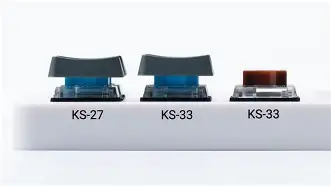
Before diving into the experiential aspect of the switch, it is essential to understand the technical evolution represented by the "2.0" designation. The original low-profile switches often felt scratchy or unstable because the shortened stem did not have enough surface area to stay centered during a keystroke. The Ks 33 2.0 series addresses these legacy issues through a redesigned structural housing and an improved stem interface. Specifically, the Blue variant is a clicky switch, designed to provide both a tactile bump and an audible "click" at the point of actuation.
The Blue 2.0 features an actuation force of approximately 52gf and a total travel distance of 3.0mm, with the actuation point occurring at roughly 1.7mm. In comparison, a standard full-sized mechanical switch usually offers 4.0mm of total travel. Cutting that literal millimeter might sound insignificant, but in the world of high-speed typing, it changes the entire rhythm of the hand. The "Blue" aspect of the Ks 33 2.0 is achieved through a click jacket mechanism that has been refined to sound crisper and less "metallic" than its predecessors. This refinement is critical because, in low-profile housings, sound tends to resonate differently against the keyboard's plate, often risking a tinny or sharp noise profile. The 2.0 iteration uses higher-quality plastics and factory-applied lubrication on the side rails to ensure that while the click is present, the friction is not.
The Typing Experience: A Week of Transition
Switching to the Ks 33 Low Profile 2.0 Blue requires an adjustment period, particularly for those coming from standard mechanical keyboards like the Cherry MX Blue or Brown. During the first few hours, muscle memory often leads to "bottoming out" with excessive force. Because the keys are physically closer to the board, the fingers do not need to lift as high, which can initially lead to a higher error rate. However, by the second day, a distinct advantage begins to emerge: efficiency. The shorter travel distance means the return rate of the key is faster, allowing for a more rapid "flutter" across the home row.
For writers and coders who spend eight to ten hours a day at a desk, the tactile feedback of the Ks 33 Blue serves as a physical confirmation of every character entered. Unlike linear switches, which can feel "mushy" in a low-profile format, the tactile bump in the Blue 2.0 is sharp and intentional. It provides a level of certainty that is often missing from laptop keyboards. The sound profile is also surprisingly sophisticated for a clicky switch. It lacks the high-pitched "ping" often found in budget mechanical boards, instead offering a snappy, rhythmic cadence that mimics the sound of a high-end typewriter. For a solo office or a home studio, this sound provides a satisfying productivity "soundtrack," though it remains a consideration for those working in open-plan environments.
Gaming Performance and Responsiveness
While clicky switches are traditionally sidelined by gamers in favor of linear ones, the Ks 33 Low Profile 2.0 Blue makes a compelling case for itself in the gaming sphere. In competitive titles where the timing of a "cool-down" or a specific movement ability is paramount, the tactile reset of the Blue switch is invaluable. The 2.0 version has a very short hysteresis—the distance between the actuation point and the reset point—which allows for rapid double-tapping that was previously difficult on low-profile clicky switches.
In real-world gaming scenarios, the reduced height of the keyboard (enabled by the Ks 33's slim profile) puts less strain on the wrist. When the hand is flatter, the tendons in the forearm are less extended, reducing fatigue during long sessions. The stability of the 2.0 stem is also noticeable here; even when hitting the corner of a keycap during a frantic moment, the switch travels vertically without tilting. This precision gives the user a sense of "oneness" with the hardware that bulky, high-profile boards sometimes lose due to the shimmy and wobble of longer stems.
Shop the latest Electronics picks on Amazon.
See Deals →Pros and Cons of the Ks 33 Low Profile 2.0 Blue
- Pro: Enhanced Ergonomics. The slim design allows for a lower keyboard height, often eliminating the need for a wrist rest and reducing the risk of repetitive strain injuries.
- Pro: Refined Tactility. The 2.0 version provides a cleaner, sharper tactile bump compared to the original version, making it one of the best-feeling low-profile switches on the market.
- Pro: Versatile Compatibility. These switches are designed to fit the increasingly popular Gateron low-profile hot-swap sockets found in many enthusiast-grade slim keyboards.
- Pro: Faster Actuation. The 1.7mm actuation point allows for quicker reactions in both professional typing and gaming contexts.
- Con: Sound Level. As a Blue switch, it is inherently loud. It may not be suitable for quiet office environments or late-night sessions if others are nearby.
- Con: Keycap Choices. Because it is a low-profile switch, it requires specific low-profile keycaps. You cannot use standard MX-style keycaps without bottoming out against the plate.
- Con: Initial Learning Curve. Users transitioning from high-profile keyboards may find the shorter travel "abrupt" for the first few days of use.
Comparison: Ks 33 Blue vs. Traditional and Competitors
To truly understand where the Ks 33 Low Profile 2.0 Blue sits in the market, it is helpful to compare it against its peers. The primary competition comes from standard-height switches and other low-profile alternatives like the Kailh Choc series.
| Feature | Ks 33 Low Profile 2.0 Blue | Standard MX Blue | Kailh Choc V2 Blue |
|---|---|---|---|
| Total Travel | 3.0 mm | 4.0 mm | 3.2 mm |
| Actuation Point | 1.7 mm | 2.2 mm | 1.5 mm |
| Actuation Force | 52 gf | 60 gf | 50 gf |
| Stem Stability | High (2.0 design) | Moderate | High |
| Noise Level | High (Clicky) | Very High | High (Clicky) |
As the table illustrates, the Ks 33 2.0 Blue finds a middle ground in actuation force, providing enough resistance to prevent accidental keypresses while maintaining a much shorter travel than a traditional switch. Its superiority over the original low-profile designs lies primarily in the stem stability and the "fullness" of the click sound.
The Buying Guide: Who Should Make the Switch?
Investing in a keyboard featuring the Ks 33 Low Profile 2.0 Blue switches is a decision that should be based on your specific workflow and environment. Because these switches are hot-swappable in many modern chassis, they offer a great entry point into keyboard customization without requiring soldering. However, there are three primary factors any potential buyer should consider before committing to this switch type.
1. The Ergonomic Priority
If you find that your wrists ache after a long day of typing on a standard mechanical keyboard, the switch to a low-profile system is one of the most effective hardware changes you can make. The Ks 33 2.0 Blue enables keyboards that sit much closer to the desk surface. This allows your hands to rest in a more neutral position. For those who prioritize health and longevity in their typing habits, this switch is a top-tier choice.
2. Tactile Feedback vs. Social Environment
The "Blue" switch is a lifestyle choice. You must love the sound and the feel of the click. If you work in a communal space, your colleagues may not share your enthusiasm. However, if you work from home or have a private office, the auditory feedback of the Ks 33 2.0 Blue can actually improve your typing accuracy. Many users find that they make fewer mistakes when they can "hear" their keyboard confirming every letter.
3. Setup Compatibility
Ensure that the keyboard you are looking at supports Gateron Low Profile switches. It is a common mistake to assume that all "low profile" switches are interchangeable. The Ks 33 variant has a specific pin layout and stem height. If you are building a custom board, check the PCB specifications to ensure it is designed for this specific 2.0 series to avoid fitment issues.
Real-World Use Cases
In the professional writing sphere, the Ks 33 Low Profile 2.0 Blue has become a favorite for those who travel. A slim mechanical keyboard equipped with these switches can easily slide into a laptop sleeve, providing a high-end typing experience at a coffee shop or in a hotel room. Standard mechanical keyboards are often too bulky for truly mobile professionals, but the Ks 33 enables a "desktop-class" feel in a portable form factor.
Looking for the best Electronics deals on Amazon?
Shop Amazon →For developers, the tactile bump is essential for navigating complex syntax and ensuring that every bracket and semicolon is accounted for. The precision of the 2.0 stem means that even when typing at speeds exceeding 100 words per minute, the keys remain consistent. Unlike membrane keyboards that can feel varying degrees of "squish" depending on where the key is struck, the Ks 33 provides a uniform response every single time.
Long-term Durability and Maintenance
One of the hidden benefits of the 2.0 iteration of the Ks 33 series is the improved dust and debris resistance. The tighter tolerances in the housing mean that fewer crumbs or hair can enter the internal mechanism. This is particularly important for low-profile boards, which are often used as "daily drivers" in varied environments. Standard maintenance is straightforward; because the keys are lower, a simple blast of compressed air is usually more effective at cleaning the plate than it would be on a deep, high-profile board.
The switches are rated for 50 to 60 million keystrokes. While this is standard for high-quality mechanical components, the 2.0 design's use of reinforced pins means that if you do choose to move the switches between different keyboard bodies, they are less likely to bend or snap during the transition. This makes them a durable investment for someone who likes to experiment with different keyboard layouts over time.
Conclusion
Moving to the Ks 33 Low Profile 2.0 Blue is more than just a downgrade in size; it is an upgrade in intentionality. It represents a shift toward a more modern, streamlined way of interacting with technology without sacrificing the tactile joy that makes mechanical keyboards so beloved. The 2.0 series successfully polished the rough edges of the first generation of low-profile switches, offering a stable, crisp, and incredibly responsive experience.
While the clicky nature of the Blue switch remains a polarizing feature, for those who crave feedback and precision, it is hard to find a better implementation in a slim format. The transition might take a few days of adjustment as your fingers learn the new "shorter" landscape, but once the rhythm is established, the benefits in speed and comfort are undeniable. Whether you are a gamer looking for a faster reset, a writer seeking a rhythmic flow, or a professional aiming to save your wrists from strain, the Ks 33 Low Profile 2.0 Blue stands as a testament to how far mechanical switch engineering has come. It is a sophisticated, reliable tool that proves you don't need a massive, heavy keyboard to have a world-class typing experience.